VIRTUALISATION

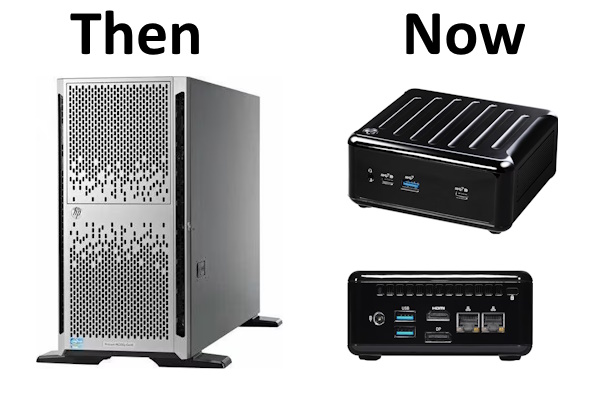
NUC replaces my old HP Server

NUC replaces my old HP Server

Hi All,

The last few days i was busy to replace my old HP ML 350e G8 Server from 2013. That Server has been working flawless over the last 10 Years. I only had to replace most of the Harddisks over Time as they where running 24x7.
Old Setup HP Server

Configuration:

  • HP ML 350e G8
  • 2x Intel 2420 1.9 GHz
  • 6 x 16 GB PC3 1600MHz (96GB)
  • 4x 600 GB SAS 15K / 2x 3TB SAS 7.2K

The Server was running several Versions of VMWare ESXi over the years and worked perfectly for my Home Lab purposes.

VMware ESXi 7.0.3 Upgrade

VMware ESXi 7.0.3 Upgrade

Hi All,

I’ve decided to upgrade my VMware ESXi 6.7 to 7.x. Searched for HPE Custom Images and was able to download the ISO File from VMware.

I’ve created a bootable USB Stick with Rufus

Then rebooted the Server and booted from the USB Stick

Enter to run the VMware ESXi 7.0.3 Installation

F10 to Accept the EULA

Selected the Volume where ESXi is installed

VMware Remote Console 12.0.5

VMware Remote Console 12.0.5

Hi All,

Seems to be i’ve missed an important update for VMware Remote Console, that was already released two months ago.
I’ve just used the “Download and install” Button

Installation was successful

After the Upgrade i’ve started the VMware Remote Console and checked the Version

Regards
Andres Bohren

VMware Remote Console 12.0.4

VMware Remote Console 12.0.4

Hi All,

Seems to be i’ve missed an important update for VMware Remote Console, that was already released two months ago.
Currently i’ve installed 12.0.2

After extracting the *.zip File i’ve started the Installation.

That ended up in a Bluescreen and restarting the Client. I had to uninstall and reinstall VMware Remote console to upgrade to the newest version.

VMware Tools for Windows 12.2.5

VMware Tools for Windows 12.2.5

Hi All,

VMware has released a Security Advisory for VMware Tools

  • VMSA-2023-0013 VMware Tools update addresses Authentication Bypass vulnerability (CVE-2023-20867)

You can download the newest version of VMware Tools here: VMware Tools 12.2.5

After loggin in you need to consent to the general Terms to download the VMware Tools

In the downloaded zip File is the ISO File with the VMWare Tools for Windows

I’ve extracted the ISO, Renamed it and uploaded it to the Datastore

ESXi670-202107001

Hi All,

An Update for ESXi 6.70 has been released by VMware

I have uploaded the ZIP File to the ESXi Datastore

I have only a Single ESXi Server. So i stop all VM’s.

Now the Patch can be installed

esxcli software vib install -d /vmfs/volumes/datastore3/ISO/ESXi670-202207001.zip

After the Reboot you can see the new Version Number ESXi 6.7.0 19997733

VMware Tools for Windows 12.0.5

Hi All,

VMware Released a Security Advisory regarding VMware Tools (CVE-2022-22977)

In order to fix it you have to install VMware Tools for Windows 12.0.5

After you have downloaded the new Version of the VMware Tools you can eighter upload the ISO to VMware ESX and assign it to the DVD Drive or open the ISO directly on the Windows Machine.

Update VMware Tools for Windows to 12.0.0 (VMSA-2022-0007)

Hi All,

VMware published a Security Advisory for the VMware Tools on Windows.

VMSA-2022-0007


VMware Tools 12.0.0 Download


On my ESXi the VM's the VMware Tools are currently running Version 11.3.5


I've extracted the "windows.iso" and renamed it to "WMwareTools12_Windows.iso"


Then uploadet it to the Datastore


Attached it to the VM


And started the setup64.exe


Regards
Andres Bohren