
Start Azure VM's with Powershell
Hallo zusammen,
In diesem Artikel zeige ich euch, wie man mit der Azure PowerShell Virtuelle Maschinen starten kann. Zunächst braucht es dazu das AZ PowerShell Modul.
Allerdings, darf dafür das Module AzureRM nicht installiert sein, weil die beiden Module inkompatibel sind. Das kann man mit dem folgenden PowerShell Befehl prüfen
Get-Module -Name AzureRM -ListAvailable
Oder gleich das installationsscript benutzen (Dazu muss die PowerShell als Administrator gestartet werden)
if ($PSVersionTable.PSEdition -eq 'Desktop' -and (Get-Module -Name AzureRM -ListAvailable)) {
    Write-Warning -Message ('Az module not installed. Having both the AzureRM and ' +
      'Az modules installed at the same time is not supported.')
} else {
    Install-Module -Name Az -AllowClobber
}

Nun kann man sich mit dem folgenden Befehl mit Azure Verbinden
Connect-AzAccount
``
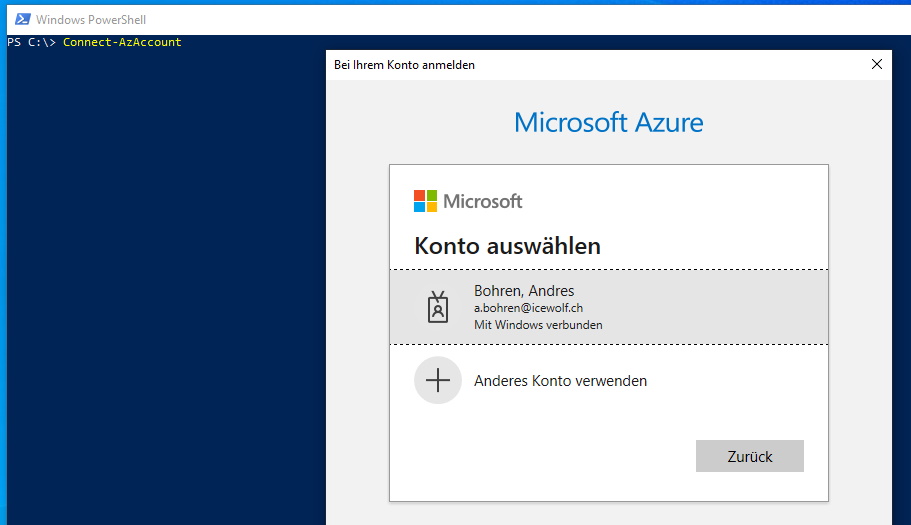

Mit dem folgenden Befehl werden die Virtual Machines auf Azure aufgelistet
- [Get-AzVM](https://docs.microsoft.com/en-us/powershell/module/az.compute/get-azvm?view=azps-5.3.0)
```pwsh
Get-AzVM -Status
Get-AzVM -ResourceGroupName <ResourceGroup>

Mit dem folgenden Befehl können nun einzelne oder alle VM’s gestartet werden
Start-AzVM -Name LAB01 -ResourceGroupName <ResourcGroup>
Get-AzVM | Start-AzVM -NoWait

Liebe Grüsse
Andres Bohren
